This extension visualizes the AI token usage as a “stamina wheel” for Claude. An obvious “The Legend of Zelda: Breath of the Wild” reference for instant UX familiarity. Install it on Firefox or Chrome / Edge.
If making a usage meter with AI for an AI service is the equivalent of designers making chairs, then this is it. Somehow, it’s a novel approach for the purpose. As of version v2.1 it’s fairly auditable by human beings at ~300 lines of JavaScript.
The AI token stamina wheel for Claude.
A browser extension that floats a compact, draggable stamina wheel over Claude, showing your session and weekly usage limits at a glance.
How it looks like
A circular widget with three concentric rings, floating at the middle right of the window. Hover the wheel to see a tooltip with exact percentages and reset times for all three limits. Hold and drag it anywhere you like — it stays put across reloads.
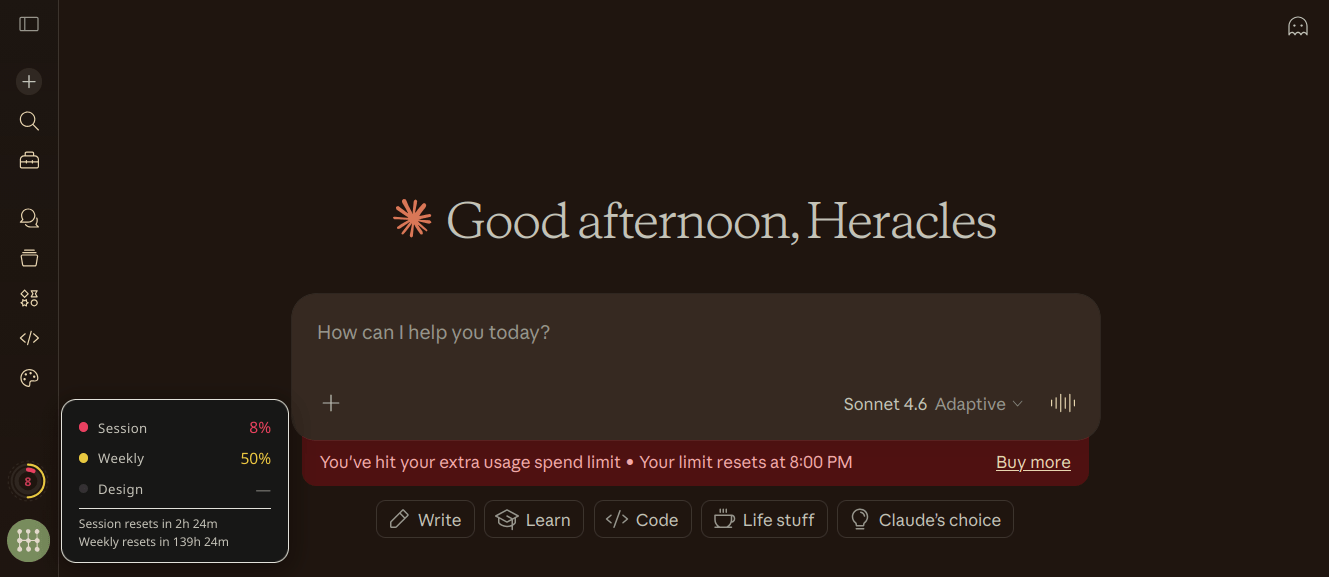
Colors shift green → yellow → orange → red as you consume capacity. The wheel carries no text — the rings are the reading, and exact numbers live in the tooltip.
When the session or weekly limit is fully spent, the rings give way to an HH:MM countdown to the reset, since that’s the only number left worth showing.
The whole widget is sized in viewport units (clamp(28px, 2vw, 56px)), so it scales with the window rather than sitting at a fixed pixel size.
From outside in, the rings visualize:
| Ring | Style | Data |
|---|---|---|
| Weekly | Solid, medium | 7-day rolling cap |
| Session | Solid, thick | 5-hour session window |
Each arc tapers to a round tip whose diameter matches its ring thickness.
When does it refresh?
- On hover — hovering the wheel triggers a refresh
- On chatbox focus or click — focusing or clicking the message composer refreshes (document-level event delegation — no observers, no polling)
- On page load — fetches once when Claude loads
All refreshes are debounced at 3 seconds and skipped entirely when the tab is backgrounded. Nothing fetches on a timer. The refresh indicator (spinning ring outside the wheel) shows when a fetch is in flight.
If Claude’s API rate-limits us (HTTP 429), staminai backs off on a 1 min → 5 min → 15 min ladder. 5xx responses trigger a 30-second cooldown. A Retry-After header overrides both if it asks for longer.
Does this cost anything?
No. staminai reads the same metadata endpoint the Settings → Usage page uses:
GET /api/organizations/{orgId}/usage
This is a lightweight JSON call. No tokens are consumed, no API credits are spent.
Install
Pending public listing in Firefox Add-ons. Currently not published in Chrome / Edge Add-on stores.
Firefox
- Download
staminai-firefox.xpifrom Releases - Go to
about:debugging#/runtime/this-firefox - Click Load Temporary Add-on → select the
.xpi
For permanent install, you may self-sign with web-ext sign.
Chrome / Edge
- Download
staminai-chromium.zipfrom Releases - Unzip
- Go to
chrome://extensions→ enable Developer mode - Click Load unpacked → select the unzipped folder
Greasemonkey / Tampermonkey / Violentmonkey
- Download
staminai.user.jsfrom Releases - Open it in a browser that has a userscript manager installed — the manager will prompt to install
- Confirm install
No @grant permissions are required; CSS is injected as an inline <style> tag.
Build from source
./build.sh
Produces dist/staminai-firefox.xpi, dist/staminai-chromium.zip, and dist/staminai.user.js.
Or build individually:
./build.sh firefox
./build.sh chromium
./build.sh userscript
./build.sh clean
Every target runs a preflight check first, failing early if a source file or a manifest-referenced icon is missing. See CLAUDE.md for build-system and contribution notes.
Project structure
staminai/
├── manifest.json     # MV3 manifest (Firefox + Chromium)
├── content.js        # Wheel logic, avatar anchoring, usage API
├── content.css       # Styling — uses Claude's own CSS variables
├── icons/            # Extension icons (16/32/48/128px)
├── screenshots/      # Browser screenshots
├── LICENSE           # MIT
├── build.sh          # Build script (MV3 zips + .user.js userscript)
├── CLAUDE.md         # Contributor guidance + browser add-on practices
├── CHANGELOG.md
└── README.md
How it works
Positioning
The wheel floats free. It is positioned in viewport coordinates and anchored to no element in Claude’s DOM, so a Claude UI change can never strand it. It defaults to the middle right and can be dragged anywhere; drags under 4px still register as a click, so the tooltip toggle is unaffected.
The position is saved as a fraction of the available space rather than as raw pixels, so it restores proportionally at any window size and is clamped back on screen when the window shrinks. The tooltip flips to whichever side of the viewport has room and nudges itself vertically near the top and bottom edges.
Scaling
The SVG lives in a fixed 0 0 100 100 coordinate space and is sized entirely by CSS via --csw-size. Every radius, stroke width and the center label are expressed as a percentage of the wheel, and the tooltip derives its type scale from --csw-font with em sizing throughout. Resizing the widget is a one-line CSS change; nothing is measured or resized in JavaScript.
Theming
The wheel background uses Claude’s own --bg-100 custom property, so it follows Claude’s theme. The tooltip uses a fixed palette matched to Claude’s dark popovers (--csw-tip-bg, --csw-tip-border, --csw-tip-text on #csw-tip).
Claude Design
Claude Design used to have its own weekly allowance, shown on a dotted outer ring. All Claude Design activity now counts toward your plan’s shared limits, so the ring and its tooltip row are gone. The dotted ring is kept in the code, switched off, for a future separate meter or a credit balance.
Permissions
| Permission | Why |
|---|---|
claude.ai/* | Content script injection + usage API calls |
No background workers. No remote code. No storage. No cookies permission. Same-origin fetch with credentials: "include" reuses your existing Claude session.
Privacy
- No data leaves your browser except to
claude.ai - No analytics, telemetry, or third-party calls
- The only thing stored is where you dragged the wheel — a single
localStoragekey (staminai:pos) holding two numbers. No usage data is ever persisted. - ~640 lines JS, ~110 lines CSS — fully auditable
FAQ
Why does the wheel show a time instead of rings?
Your session or weekly limit is fully spent. The HH:MM is how long until it resets.
Can I move the wheel? Yes — hold click and drag it anywhere. Its position is remembered per browser.
Where did the Design ring go? Claude Design no longer has its own allowance — its usage counts toward your plan’s shared session and weekly limits, which the two rings already show.
Does it work with all plans? Yes — Pro, Max, Team, Enterprise. The usage endpoint returns data for whatever plan your session is on.
To-Do
Nothing outstanding right now — see CHANGELOG.md for recent changes. File an issue if something’s broken or missing.
Dialectic Acheiropoieton of Heracles Papatheodorou and Claude, MIT License